Brake Rotor Health Checker
Select the symptoms you are experiencing with your vehicle's brakes to receive an immediate diagnostic assessment and recommended action.
Awaiting Input
Please select symptoms above to generate a report.
You’re cruising down the M60, and suddenly your steering wheel starts shaking. Or maybe you hear a grinding noise every time you tap the brakes. Most drivers ignore these cues until the car stops working properly, but here’s the truth: brake rotors are the unsung heroes of your stopping power, and when they fail, they don’t just make noise-they compromise safety. If you’re wondering whether those vibrations mean trouble or if that squeal is just dust, this guide breaks down exactly what bad rotors look, feel, and sound like.
Vibration in the Steering Wheel or Pedal
The most common sign of warped or unevenly worn rotors is vibration. When you press the brake pedal, the calipers squeeze the pads against the rotor surface. If the rotor isn’t perfectly flat, it pushes back unevenly. This force travels through the hydraulic system and into the steering column.
Here is how to distinguish normal wear from serious damage:
- Steering Wheel Shakes: If the wheel vibrates only when braking, especially at higher speeds (above 40 mph), your front rotors are likely warped. The uneven surface causes the pads to grab and release rapidly.
- Pedal Pulsation: If the brake pedal itself pulses up and down under your foot, the issue might be rear rotors or severe front rotor warping. Rear issues often feel less dramatic because the rear brakes handle less load, but they still affect stability.
- Constant Vibration: If the steering wheel shakes even when you aren’t braking, check your tires first. It could be a balance issue or a bent rim. But if the shake stops when you let off the gas and returns when you brake, it’s almost certainly the rotors.
Noise That Changes With Speed or Pressure
Squealing can mean many things-glazed pads, lack of lubrication on the backing plate, or even cheap aftermarket parts. But specific noises point directly to rotor health.
A high-pitched squeal that persists after replacing pads usually indicates a wear indicator metal tab attached to the brake pad that contacts the rotor when the pad material is thin. However, if you hear a deep, metallic grinding sound, you’ve likely missed the warning window. This happens when the metal backing plate of the pad grinds directly against the rotor surface. At this stage, the rotor is scored with deep grooves and cannot be resurfaced effectively. You’ll need new rotors and pads.
Another subtle cue is a clicking or ticking sound when turning while braking. This often points to loose components or severely worn rotors causing the caliper to shift slightly during engagement.
Visible Damage and Surface Irregularities
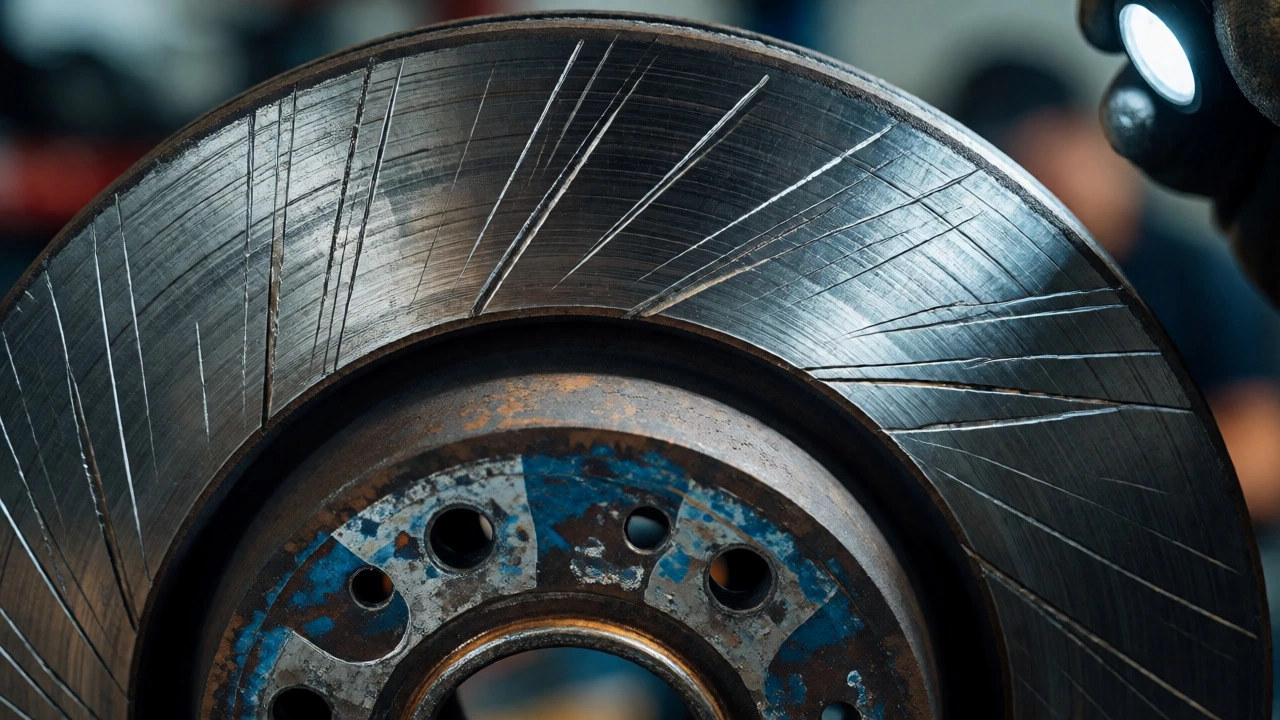
If you can see your wheels (especially with alloy rims), take a closer look. You don’t need a mechanic’s eye to spot obvious problems. Shine a flashlight on the rotor face and look for these red flags:
- Deep Scoring: Run your fingernail lightly across the rotor surface (when cool). If it catches in deep grooves, the rotor is compromised. Light scoring is normal; deep gouges are not.
- Blue Discoloration: A bluish tint on the rotor surface indicates overheating. This happens when brakes are used excessively without cooling, such as driving downhill in the Peak District with heavy loads. Overheated rotors lose their structural integrity and warp easily.
- Rust Rings: A small ring of rust around the outer edge is normal. However, if rust covers the entire friction surface where the pad contacts the rotor, it suggests the car hasn’t been driven enough to clean them off, or moisture has caused pitting. Pitting creates an uneven surface that reduces braking efficiency.
- Cracks: Look for hairline cracks radiating from the center hub outward. While minor heat checking (tiny surface cracks) can be normal on high-performance cars, large cracks indicate metal fatigue. These rotors are dangerous and must be replaced immediately.
Inconsistent Braking Performance
Beyond noise and vibration, pay attention to how the car behaves. Bad rotors change the way your vehicle stops.
If the car pulls to one side when braking, it doesn’t always mean a stuck caliper. Sometimes, one rotor has more material removed than the other due to uneven wear or previous machining errors. This imbalance causes different friction levels on each side.
Also, note the pedal feel. If the pedal feels spongy, air in the lines is the usual suspect. But if the pedal feels hard yet the car takes longer to stop, glazed rotors might be the culprit. Glazing occurs when the rotor surface becomes too smooth and shiny, reducing the friction coefficient needed to slow the car down. This often happens with low-quality pads or excessive heat cycles.

When to Replace vs. Resurface
Many drivers ask if they can just machine the rotors instead of buying new ones. In the UK, labour costs for resurfacing often approach the cost of new budget-friendly rotors. Here is a quick decision framework:
| Condition | Action | Why? |
|---|---|---|
| Light scoring, within thickness spec | Resurface | Cheap fix if local shop offers it; restores flatness. |
| Deep scoring or blue spots | Replace | Machining removes too much metal, leaving rotor too thin and prone to warping. |
| Below minimum thickness (marked "Min Th") | Replace | Structural failure risk; cannot hold heat effectively. |
| Large cracks visible | Replace | Immediate safety hazard; machining won't remove deep cracks. |
Always check the "Min Thickness" stamp on your current rotors. If they are close to this limit, replacing them is non-negotiable. Thin rotors overheat faster, leading to brake fade-a condition where the brakes simply stop working because they are too hot.
Preventing Premature Rotor Wear
You can extend the life of your rotors by changing how you drive. Aggressive braking generates immense heat. Instead of slamming on the brakes, anticipate traffic flow and ease off the accelerator earlier. This uses engine braking to slow the car, saving heat buildup in the rotors.
Also, never mix old pads with new rotors unless absolutely necessary. Old pads have a shape molded to the old rotor surface. Putting them on a fresh, flat rotor leads to uneven contact, reduced braking power, and rapid re-warping. Always replace pads and rotors together for optimal performance.
How long do brake rotors last?
Most rotors last between 50,000 and 70,000 miles, but this varies wildly based on driving style and vehicle weight. City driving with frequent stops wears them out faster than highway cruising. Heavy vehicles like SUVs also shorten rotor life compared to smaller hatchbacks.
Can I drive with bad rotors?
Short distances to a garage are fine if the vibration is mild. However, avoid high-speed motorway runs or steep descents. Warped rotors reduce braking efficiency and increase stopping distance, which is risky in emergency situations. If you hear grinding, stop driving immediately to prevent damage to the calipers.
Why are my new rotors making noise?
New rotors and pads need a break-in period called bedding-in. During the first few hundred miles, slight squeals are normal as the transfer layer forms. If the noise persists after 500 miles, check for proper installation torque or potential manufacturing defects in the rotor surface finish.
Is it safe to use drilled or slotted rotors?
Yes, for most daily drivers. Drilled holes help dissipate heat and gas, while slots clean the pad surface. However, drilled rotors are more prone to cracking under extreme stress compared to solid rotors. For standard commuting, they offer good performance and aesthetics without significant downsides.
Do I need to replace rotors every time I change pads?
Not always, but it is highly recommended. Replacing rotors ensures maximum braking performance and prevents premature pad wear. Since labour costs for accessing the brakes are the same, adding the cost of new rotors often makes financial sense compared to paying for two separate jobs later.